Welcome to The Studio

What this is
Studio is my Notion home base. It holds my week (priorities, trackers, and the links I always need) and gives me a starting line when my week feels slippery.
In this post, I’m giving you the tour — what the dashboard looks like, why it’s built this way, and how I use it to turn Notion work into posts on https://atilacore.pckt.blog.
Quick tour (what you’re looking at)
When I open the Studio page, I can see my week, my priorities, and what I’m doing next.

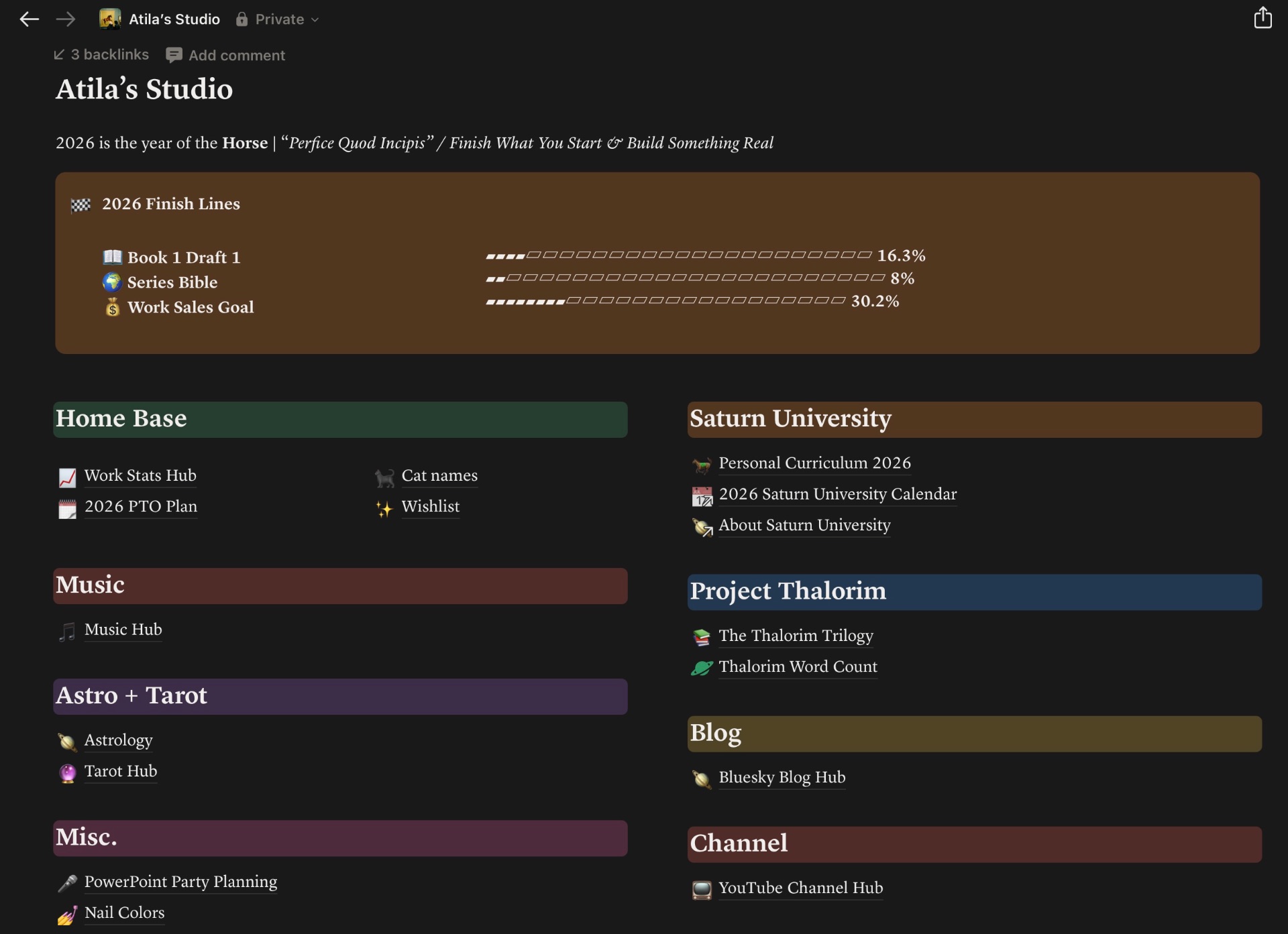
Alt text: Dark-mode Notion dashboard titled “Atila’s Studio.” A thin banner at the top references a Year of the Horse theme. Under it is a “2026 Finish Lines” scoreboard with progress-style bars, followed by grouped sections of linked hub tiles arranged in a neat grid.
The layout (3 layers)
- Top: theme reminder + a “finish lines” scoreboard (progress bars I can’t ignore)
- Middle: hub links to my main life zones (so I can get where I need in two clicks)
- Bottom: the “I’m a person, not a robot” zone (music, astro/tarot, misc joy pages)
What to notice
- The finish lines area is the anchor — it pulls me back to completion.
- The hub links are the on-ramps — I don’t need motivation; I need fewer clicks.
- The whimsy zone is maintenance — it keeps the system from turning into a chore.
Why it’s built like this
I’m a Tumblr girlie at heart. I miss the customization and free-form chaos — the colors, the little graphs, embedded links, and the kind of auto-play you could hide so nobody can reasonably pause your Frank Ocean MP3 master list. I miss the feeling that your space is yours.
But I’m more writer than coder, so the “build a website from scratch” era was never my promised land.
Notion is the sweet spot: an all-in-one workspace for notes, docs, and dashboards that lets me build a home base, track progress, make it pretty, and then get back to writing.
Life sims and the starting line
I’ve always loved the feeling of a life sim: a home base, a menu of quests, and progress you can actually see. As a kid, that itch lived in Dream Life and Pixel Chix.
Studio is the adult version: one place to look, one next step, visible progress.
Life tracking (without turning into surveillance)
I only track what changes my behavior. If a number helps me make a decision or keep a promise to myself, it stays. If it turns into shame math, it gets cut.
How it connects to Saturn University
Saturn University is the bigger philosophy: stop collecting “good ideas” and start finishing real work. My filter question is: does this serve what I’m trying to finish? If not, it’s noise (even if it’s interesting).
Studio is the infrastructure for completion-over-perfection.
And yes, the aesthetic matters. I’m more consistent when the system feels cohesive. That’s not decoration; it’s morale.
Why pckt.blog
I didn’t want the tool to decide the tone. I wanted a place to blog that doesn’t feel like a business — no constant “brand voice” performance, no monetization pressure, no content machine. Just posting to post.
I researched Substack just to understand how it works, and I get why people love it — but I’m not looking to start a Substack.
I kept thinking about Tumblr too. I miss the customization and the mess and the “this is my corner” feeling. But I didn’t want to come out the gate like “welcome to my $20 paywall,” and even a $1 Patreon tier felt… weirdly presumptuous this early on.
The thing that made it click was talking about it on Bluesky. Someone told me pckt.blog gives you a shareable link — and that you can connect it to your Bluesky account, so you can share posts in the same place you’re already talking. People can subscribe with their Bluesky account too.
So I landed on pckt.blog. Low-pressure. Bloggy. And not into the void.
How Studio turns into posts
I have a lot of stuff in Notion that’s building out these projects of mine, and posting that work-in-progress is just as useful (and motivating) as posting a finished product.
On the Notion side, I run everything through my Bluesky Blog Hub — it’s where I keep the posting calendar, my draft template, and my Blog Posts database.
The workflow is simple:
- Plan in Notion
- Draft in Notion
- Publish on https://atilacore.pckt.blog
Studio stays the behind-the-scenes system; the blog stays the “outside world.”
What each dashboard section is for
Think of these as hubs, not a checklist — I only drop into what I need.
Home Base
- Work Stats Hub: day-job numbers + goals (so they don’t live in my brain 24/7)
- 2026 PTO Plan: rest strategy + recovery time on purpose
- Cat names: pure joy + low-stakes list-making
- Wishlist: “I want that” holding pen so I can decide later
Music
- Music Hub: projects, session notes, and a small “do something today” checklist
Astro + Tarot
- Astrology: quick links + a database for charts
- Tarot Hub: reading log + spreads + deck library
Misc.
- PowerPoint Party Planning: a reusable hosting playbook (timeline, logistics, guest info, consent rules)
- Nail Colors: an aesthetic tracker because the vibes matter
Saturn University
- Personal Curriculum 2026: the semester HQ
- 2026 Saturn University Calendar: timeline view of deadlines + milestones
- About Saturn University: the “what is this system and why does it exist?” explainer
Project Thalorim
- The Thalorim Trilogy: master hub for the story world
- Thalorim Word Count: the scoreboard (word counts, deadlines, momentum)
Blog + Channel
- Bluesky Blog Hub: blog operations home + where posts live
- YouTube Channel Hub: long-range strategy HQ
How I use Studio (design + layout)
The way I use Studio is mostly about layout. I built it so my eyes land on the same three zones every time: a theme reminder at the top, finish lines I can’t ignore, and then the on-ramps (the hub links) that get me to the actual work in two clicks.
That structure is on purpose. When I’m scattered, I don’t need a perfect plan — I need a page that tells me what to do next.
Weekly (or whenever I’m drifting), I do dashboard maintenance:
- Tidy loose notes
- Re-pick 1–3 priorities
- Refresh the finish lines so the dashboard keeps pointing at what I’m actually trying to complete
Horse year note
2026 is my Year of the Horse: finish what you start, build something real. That theme lives on the dashboard on purpose.
For the record: Lunar New Year 2026 (aka Chinese New Year) is February 17, 2026. (Source)
Talk to me
If you’re building your own “home base” page, I’d love to know:
- What do you want your dashboard to do for you (starting line, motivation, tracking, reminders, all of the above)?
- What do you always wish you could see at a glance?
If you try the simple version (or you already have something like this), reply with what’s working and what’s not — I’m nosy and I love a systems story.
Closing
Atila Martin
Bluesky: https://atilacore.bsky.social
Contact: [email protected]